How Many Dock Doors Do I Need? Formula, Calculator and How Much Buffer to Add
Size your loading dock from truck volume, not floor area. Use the planners' formula, run your own numbers in the calculator, and see how long trucks queue when doors run too full.

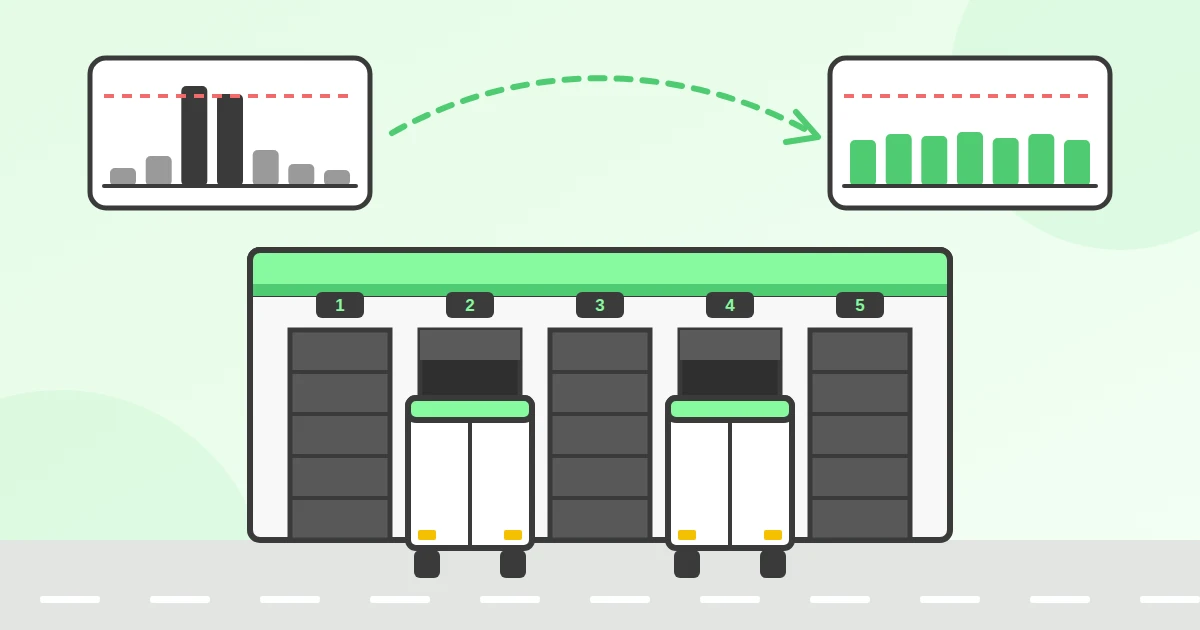
The number of dock doors you need is trucks per hour in your busiest hour × hours each truck spends at a door, rounded up. Twenty trucks over an eight-hour day at 50 minutes each works out to 2.08 doors, so you need 3. Squeeze the same 20 trucks into a four-hour morning and you need 5.[1] Floor-area ratios such as "one door per 10,000 square feet" are a sanity check for an empty building, not a way to size a working dock.
The formula gives you a minimum with no buffer. How much buffer to add depends on how many doors you have and how evenly trucks arrive, and that is where most sizing goes wrong. Below: a calculator, a queueing table we calculated for this article, and why spreading arrivals with booked appointments is often cheaper than building a new door.
Dock door calculator
Move the sliders to match your site. The result updates as you go.
How do you calculate the number of dock doors you need?
Multiply the number of trucks you serve per hour by the time, in hours, each truck occupies a door, then round up. The result is the number of doors that are busy at the same time.
Dock doors = trucks per hour × hours per truck at the door (rounded up)
Two dock planning guides published by loading dock equipment makers use exactly this method. Kelley's Dock Planning Standards says you need three inputs: the number of trucks, the average loading or unloading time per truck, and the timing of arrivals and departures.[1] W.B. McGuire's dock design guide states the same formula and works an example: 48 trucks over 8 hours at 45 minutes each is 6 trucks per hour × 0.75 hours, or 4.5 dock positions, which rounds up to 5 doors.[2]
You need three numbers, and you probably have all of them in a carrier log or WMS export:
- Trucks per day. Count inbound and outbound separately. If the same doors serve both, add them together for the calculator.
- Time at the door per truck. From the moment the truck is docked until it pulls away, including the paperwork and the walk to find someone to sign. Forklift time alone undercounts it.
- When the trucks arrive. The daily total matters less than the busiest hour. A dock that handles 40 trucks spread over ten hours is a different dock from one that gets 20 of them between 07:00 and 09:00.
If you already timestamp loadings, your average time at the door is the service time in your dock utilization and dwell time KPIs. If you do not, time 20 trucks with a phone over a week and use the median.
How long does it take to load or unload a truck?
It depends mostly on whether the goods are palletized. In the one neutral comparison we could find, a palletized trailer took about an hour to unload and the same product floor-loaded took more than two.
That was a 1998 study of boxed-meat deliveries for Supervalu, reported by Supermarket News: an average of 62 minutes palletized against 142 minutes floor-loaded.[3] Little newer neutral data has been published, so treat it as an illustration of the gap and measure your own site.
To turn pallets per day into trucks per day, use what fits on a full trailer:
| Trailer | Pallets per full load | Source |
|---|---|---|
| European 13.6 m semi-trailer | 33 EUR pallets (1200 × 800 mm) or 26 industrial pallets (1200 × 1000 mm) | DP World Euroliner specification[4] |
| U.S. 53 ft trailer | 26 standard GMA pallets (48 × 40 in, the common U.S. grocery pallet) loaded straight, up to 30 loaded turned | Nelson Company pallet loading guide[5] |
Many deliveries are part loads. A part load of eight pallets still takes a door, a driver who needs to reverse in and someone to sign the paperwork, so count it as a truck, not as a fraction of one.
How do you account for peak hours?
Size for the busiest hour, not the daily average. McGuire's guide puts it directly: carriers tend to deliver in the morning and collect in the afternoon, so the door count should equal the maximum number of trucks at the dock during peak hours.[2]
The peaks are real and predictable. A 2008 study of 12 distribution centers in the Chicago area by the Illinois Center for Transportation found arrivals concentrated between 08:00 and 10:00 (and overnight), with departures heaviest between 16:00 and 18:00.[6]
Kelley's example shows what that does to the door count. Twenty trucks at 50 minutes each over an eight-hour day need 2.08 doors, so 3. Squeeze the same 20 trucks into a four-hour morning and you need 4.17, so 5. The trucks and the work are the same. The two extra doors come purely from when they turn up.
The calculator's "busiest hour" slider does the same thing. A setting of 2× means the busiest hour gets twice the trucks of an average hour. If you do not know your number, count the arrivals in your busiest hour over two weeks and divide by the daily average per hour.
Why can't you plan for 100% dock door utilization?
You can't, because trucks don't arrive on a perfect beat. When doors are busy close to 100% of the time, a truck that turns up early or a load that runs long starts a queue, and the queue grows much faster than utilization does.
This is standard queueing theory. Kingman's 1961 formula shows that average waiting time scales with u ÷ (1 − u), where u is utilization, multiplied by how variable the arrivals and service times are.[7] Going from 80% to 90% busy does not add 10% more waiting. It more than doubles it.
To put numbers on it, we calculated how often a truck has to wait for a free door, and for how long, using the standard Erlang C queueing model. Each cell shows the chance an arriving truck waits, then the average wait across all trucks (including those that drive straight onto a door), for a 60-minute stop:
| Dock doors | 60% busy | 70% busy | 80% busy | 90% busy |
|---|---|---|---|---|
| 2 | 45% · 34 min | 58% · 58 min | 71% · 1 h 47 min | 85% · 4 h 16 min |
| 4 | 29% · 11 min | 43% · 21 min | 60% · 45 min | 79% · 1 h 58 min |
| 6 | 20% · 5 min | 34% · 11 min | 52% · 26 min | 74% · 1 h 14 min |
| 10 | 10% · 2 min | 22% · 4 min | 41% · 12 min | 67% · 40 min |
| 20 | 2% · under 1 min | 9% · 1 min | 26% · 4 min | 55% · 17 min |
Small docks need more headroom than large ones. A two-door dock at 80% busy keeps trucks waiting an average of almost two hours, which is a detention invoice. A 20-door dock at the same utilization keeps them waiting four minutes. A single utilization target ignores this.
Rounding up the formula is not always enough. Kelley's 2.08-door example rounds to 3 doors, but with trucks arriving at random, 3 doors still means about half of all trucks wait and the average wait is 26 minutes. A fourth door cuts that to one truck in five and about 5 minutes.
The model assumes trucks arrive at random, the way they do when carriers turn up whenever suits them. Booked appointments break that assumption in your favor: arrivals become more even, the variability term in Kingman's formula shrinks, and the same doors carry more trucks before a queue forms. That only works if the schedule is respected, which is why stopping double-booking at the dock comes before any of this.
Should you have separate inbound and outbound dock doors?
Share the doors if your inbound and outbound peaks fall at different times of day; separate them if they overlap or if the goods need different handling.
Shared doors are more efficient on paper because a door can switch between receiving in the morning and shipping in the afternoon, which is exactly the pattern the Illinois data shows. They become a problem when a late inbound truck sits on the door your outbound driver was promised. Even for the shape of a cross-dock building, research by Bartholdi and Gue found that the best answer depends on facility size and the pattern of freight flows, so there is no single right layout.[8]
A practical rule: run the calculator once for inbound and once for outbound. If the two busiest hours are at different times, the shared total is the larger of the two results. If they overlap, you need the sum.
Whichever way you go, keep one door you never schedule. Kelley suggests a position for waste removal[1], and a free door is also where a rejected load or a broken-down trailer can sit without blocking the rest of the day.
How many dock doors per square foot (or square meter)?
Distribution warehouses commonly run about one dock door per 5,000 to 10,000 square feet (roughly one per 465 to 930 m²), with cross-dock and high-velocity sites much denser, according to industrial landlord Link Logistics.[9]
A real example: a 303,364 sq ft (about 28,200 m²) distribution building in Jupiter, Florida, was specified in 2025 with 43 dock doors, about one per 7,050 sq ft.[10]
Use the ratio when you are comparing buildings to lease, because it is the only number you have before you know who will use the space. Do not use it to decide how many doors your operation needs. A 10,000 m² cold-storage warehouse that receives 15 trucks a day and a 10,000 m² parcel cross-dock that turns 200 have the same floor area and nothing else in common.
How far apart should dock doors be?
Plan dock doors at least 12 feet (3.7 m) apart, center to center, and 14 feet (4.3 m) if you have the space.[1][11] Kelley recommends 14 feet as the minimum where drivers have to open or close swing trailer doors at the dock.[1]
Wider spacing also means a shallower apron (the paved area trucks maneuver on in front of the doors). A truck needs less room to swing in when the neighboring doors are farther apart. Kelley's planning table for a tractor with a 40 ft container:
| Door centers | Apron depth needed |
|---|---|
| 12 ft (3.7 m) | 120 ft (36.6 m) |
| 13 ft (4.0 m) | 116 ft (35.4 m) |
| 14 ft (4.3 m) | 113 ft (34.4 m) |
| 16 ft (4.9 m) | 110 ft (33.5 m) |
| 18 ft (5.5 m) | 108 ft (32.9 m) |
The same guide lists 8 ft wide doors as common, with 8, 9 or 10 ft heights, and suggests 8 ft 6 in to 9 ft wide doors so a trailer parked slightly off-center can still be served.[1]
Can dock scheduling replace adding a dock door?
Often, yes. If the calculator shows a large gap between "with booked appointments" and "without", the doors you are short of are a timing problem, not a building problem.
A new door is expensive. One U.S. design-build contractor's 2026 estimate puts the structural work (cutting a new opening into an existing wall, forming the pit and extending the apron) at $80,000 to $150,000 per position.[12] Prices in Europe will differ, but the order of magnitude is the point.
A worked example with illustrative numbers: a distributor open 06:00 to 16:00, using the same doors for inbound and outbound.
| Item | Value |
|---|---|
| Inbound trailers per day (1 h at the door each) | 30 → 30 door-hours |
| Outbound trucks per day (1 h each) | 20 → 20 door-hours |
| Doors if all 50 trucks were spread over 10 hours | 50 ÷ 10 = 5 |
| Busiest hour today (07:00 to 08:00) | 7 inbound + 2 outbound = 9 trucks |
| Doors needed for that hour | 9 |
| Doors with booked slots, plus one buffer door | 6 |
Nine doors cover today's morning rush. Six doors cover the same 50 trucks once inbound suppliers book slots spread through the day, with utilization near 83%. That only works because booked arrivals are even: with trucks arriving at random, the queueing table shows 6 doors at 80% busy would still mean a 26-minute average wait. At the contractor's prices above, the three doors you don't need to build would cost $240,000 to $450,000.
Spreading arrivals is what dock scheduling does: carriers book a slot on a calendar instead of turning up when it suits them, and time slot management lets you cap how many trucks can book each hour and set slot lengths per load type. It also cuts the waiting that turns into detention, which we cover in how to reduce detention fees.
LoadingCalendar costs $99 a month flat for unlimited docks, users and bookings, with a 14-day trial and no card required. Run the calculator with your current peak, then again at 1.2×, and compare the gap with what a new door would cost.
Frequently asked questions
Sources
- Kelley (4Front Engineered Solutions), "Dock Planning Standards": dock position formula and worked example (20 trucks, 50 minutes, 3 positions; 5 if all arrive in 4 hours); three planning inputs; one position for waste; 12 ft minimum and 14 ft recommended door centers; apron depth table; door sizes. kelleydocksolutions.com
- W.B. McGuire, "Loading Dock: Guide to Dock Design & Construction" (2021): trucks per hour × load time per truck = dock positions; 48 trucks over 8 hours at 45 minutes = 4.5 positions; size for peak hours. wbmcguire.com
- Supermarket News, "Palletization cuts product turnaround times: study" (February 1998): Supervalu, CHEP and Excel Corp. study, 62 minutes to unload palletized boxed meat against 142 minutes floor-loaded. supermarketnews.com
- DP World, Euroliner equipment specification: 13.62 m internal length, 33 Euro pallets or 26 UK pallets. dpworld.com
- Nelson Company, "How many plastic pallets fit on a 53-foot truck?" (updated September 2026): 30 stacks of 48 × 40 pallets turned, 26 loaded straight. nelsoncompany.com
- DeVries and Dermisi, "Regional Warehouse Trip Production Analysis: Chicago Metropolitan Area", Illinois Center for Transportation, FHWA-ICT-08-025 (2008): 12 distribution centers, arrival peaks 08:00 to 10:00 and overnight, departure peak 16:00 to 18:00. rosap.ntl.bts.gov
- J.F.C. Kingman, "The single server queue in heavy traffic", Mathematical Proceedings of the Cambridge Philosophical Society 57(4), 902–904, 1961. doi.org
- John J. Bartholdi III and Kevin R. Gue, "The Best Shape for a Crossdock", Transportation Science 38(2), 2004: the best crossdock shape depends on facility size and the pattern of freight flows. ideas.repec.org
- Link Logistics, "Warehouse storage capacity: a guide to maximizing space" (February 2026, updated October 2026): distribution users commonly run one dock door per 5,000 to 10,000 square feet. linklogistics.com
- Cushman & Wakefield, Woodmont Industrial (Jupiter, Florida) property specification (May 2025): ±303,364 sq ft building, 43 loading docks, 9 × 10 ft dock doors. cushmanwakefield.com
- Blue Giant, "Truck berths" planning and design guidance for architects: berths at least 12 ft (3.7 m) center to center, 14 ft (4.3 m) where space and budget permit. bluegiant.com
- Terrapin Construction Group, "Loading dock equipment cost per door" (August 2026): new opening in an existing wall, pit and apron extension at $80,000 to $150,000 per position (one contractor's U.S. estimate). terrapincg.com
The queueing table is our own calculation using the Erlang C (M/M/c) model with random arrivals and a 60-minute average stop; it is pessimistic for sites where trucks book appointments. The distributor example is illustrative arithmetic, not measured data.
You might also like
The four dock scheduling KPIs that matter: dock utilization rate, truck dwell time, on-time arrival rate and no-show rate. Formulas, a worked example and honest benchmarks.

OTIF (On Time In Full) is the share of orders delivered complete and within the agreed window. Formula, worked example, benchmarks and how to measure it.
How to reduce detention fees: put every truck on an appointment, match slot lengths to real loading times, and log arrival, dock-in and departure automatically.
Ready for simpler warehouse scheduling?
Join warehouse teams across the world that replaced spreadsheets and phone calls with simple dock appointment scheduling software.
Start My Free Trial 14-day free trial · No credit card required · Cancel anytime